Skip to content

Prove your device security, continuously.

An agent checks twelve hardening controls on every laptop and server, fixes many in one click, and keeps the evidence your auditor asks for.

First 2 devices free. Windows, macOS and Linux. Hosted in Germany (Hetzner, Falkenstein).

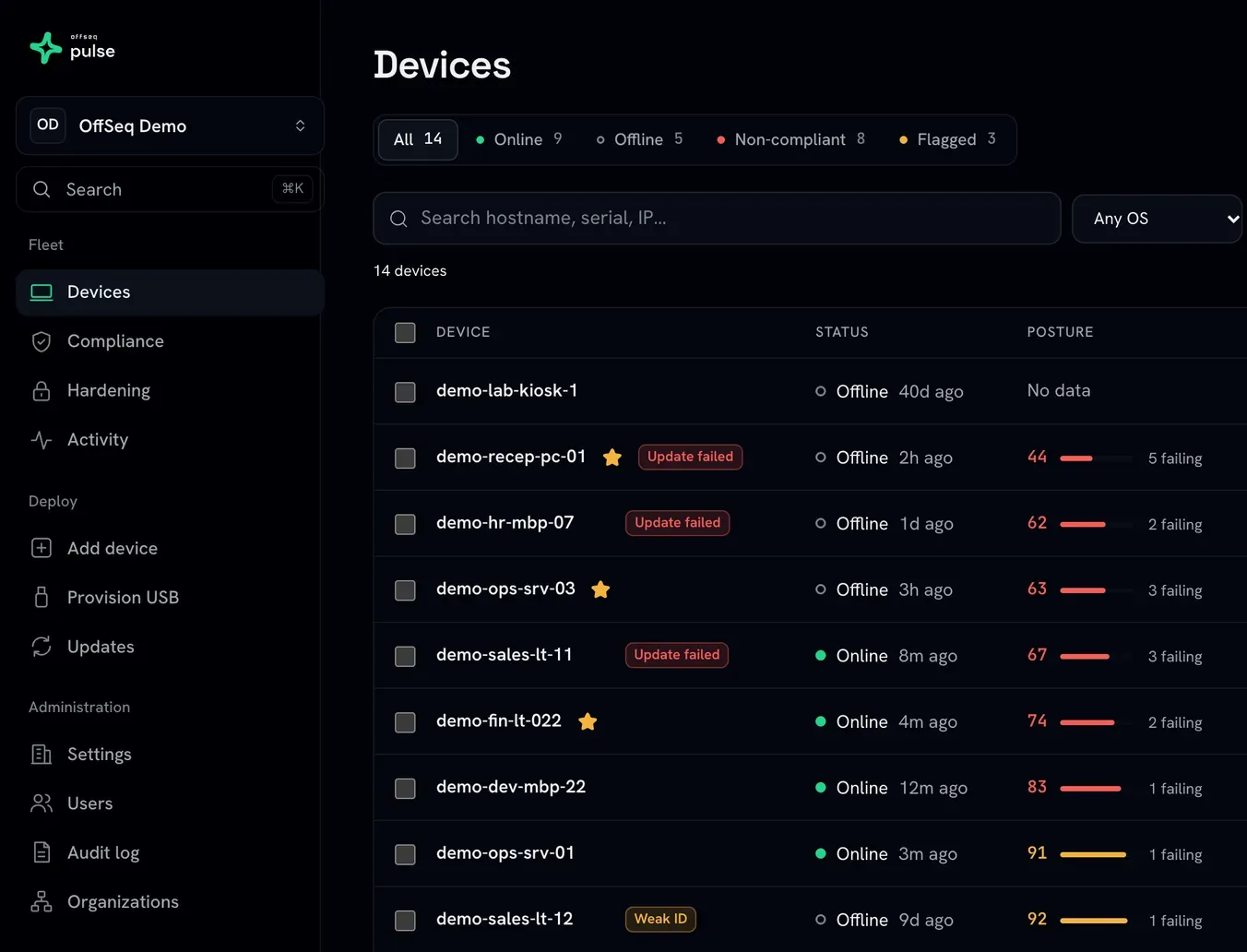
The Pulse devices view: demo devices sorted by worst posture, with status, posture score and failing-control count.

Twelve controls, checked on every check-in

Each control is a technical measure with a severity and a citation you can hand an auditor. Organisational duties such as incident handling, MFA policy and backups are tracked separately.

NIS2
Directive (EU) 2022/2555, Art. 21(2)
CIS v8.1
CIS Critical Security Controls v8.1
Cabinet Reg. 397
Latvian Cabinet Regulation No. 397
A check-in from lv-rix-lt-014 (Windows 11 Pro): 8 of 11 controls pass, 3 fail, posture score 74 out of 100.
ControlSeverityNIS2CIS v8.1Cabinet Reg. 397One-click fix
Disk encryption enabledFull-disk encryption (BitLocker / FileVault / LUKS) protects data at rest.criticalArt. 21(2)(h)3.6§81.2Manual fix
Host firewall enabledThe OS firewall limits inbound network exposure.highArt. 21(2)(e)4.5§55.7Windows, macOS, Linux
Endpoint protection activeAnti-malware / endpoint protection is enabled and running.highArt. 21(2)(e)10.1–Windows
Operating system up to dateNo pending operating-system security updates are outstanding.highArt. 21(2)(e)7.3§46Manual fix
Automatic updates enabledThe OS installs security updates automatically.mediumArt. 21(2)(e)7.3§46Windows, macOS, Linux
Screen lock requires a passwordThe device locks after inactivity and requires a password to unlock.mediumArt. 21(2)(i)4.3–Windows, macOS, Linux
Secure Boot enabledUEFI Secure Boot protects the boot chain against tampering.mediumArt. 21(2)(e)––Manual fix
Removable storage controlledUSB mass-storage is restricted to limit data exfiltration and malware ingress.mediumArt. 21(2)(i)––Windows, Linux
Guest account disabledThe built-in Guest account is disabled.mediumArt. 21(2)(i)4.7§51.1Windows
Account lockout policy setA failed-logon lockout threshold throttles password guessing.lowArt. 21(2)(i)4.10–Windows
Operating system still supportedThe OS version still receives security updates from its vendor.highArt. 21(2)(e)2.2–Manual fix
Signed-in user is not an administratorDaily work runs from a standard account; administrator rights stay with a separate account.mediumArt. 21(2)(i)5.4§51.5Manual fix

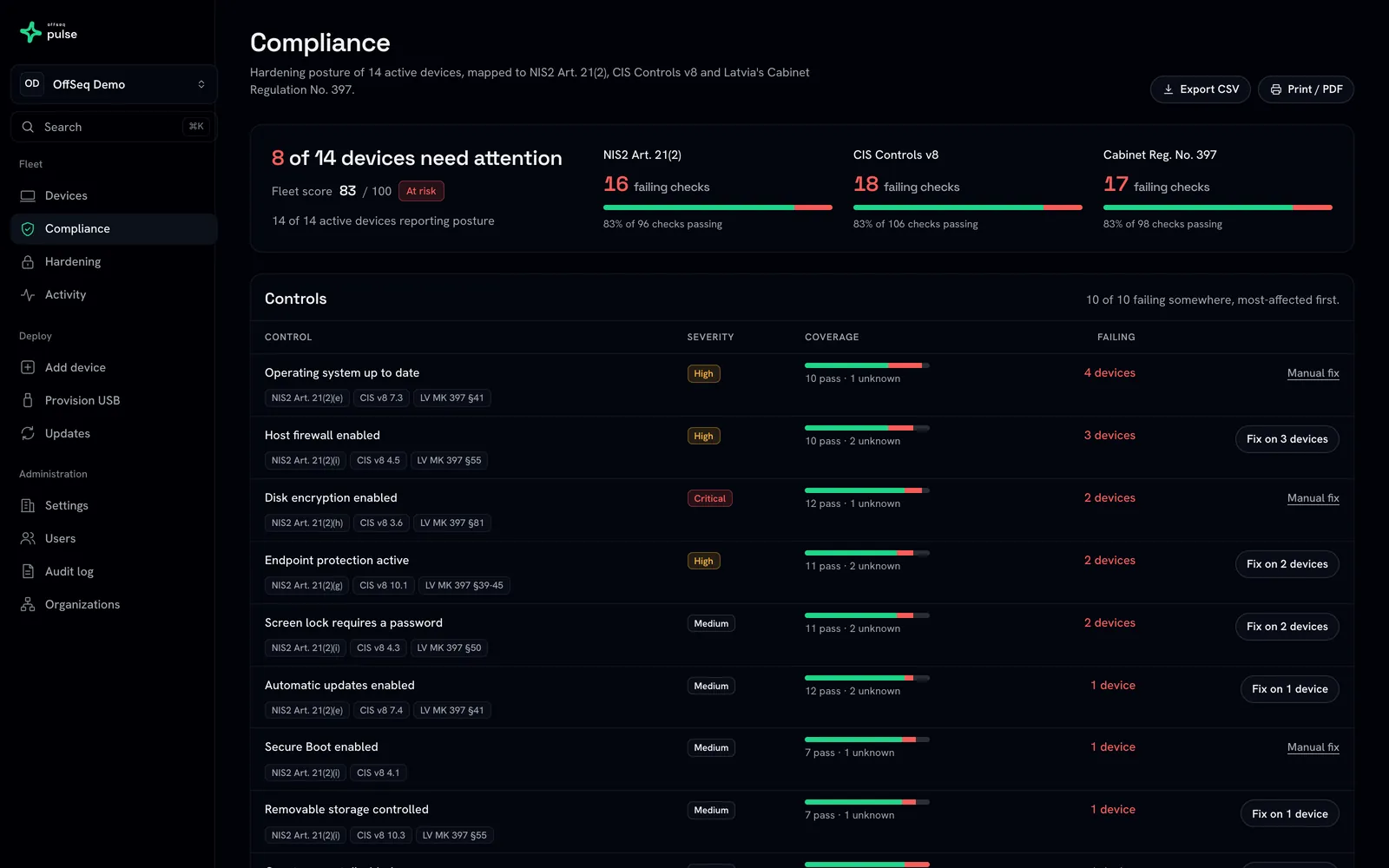
From a failing control to audit evidence

The compliance view, as an operator sees it, in four steps: what fails, which clause it breaks, the fix, and the evidence.

  1. 1See what needs attention

    The fleet score is severity-weighted, so one unencrypted laptop counts for more than a missing lockout policy. Devices that need attention are counted first.

    • Score per device and per fleet
    • Critical controls weigh most
  2. 2Read it against the framework

    Every check cites the NIS2 Art. 21(2) point it supports, plus the CIS v8.1 safeguard and Cabinet Reg. 397 point where one exists, with failing checks counted per framework.

    • Clause reference on every control
    • Organisational duties tracked separately
  3. 3Fix a failing control

    Controls are ranked by how many devices fail them. Where the agent ships a vetted fix, apply it to every failing device at once; the rest show manual fix steps.

    • The agent re-checks after each fix
    • Every fix lands in the audit log
  4. 4Hand the auditor evidence

    Export per-control evidence as CSV or print the page to PDF, with the framework reference on every row.

    • CSV per control and device
    • Print-ready PDF view

Also in the console

Remote response and theft control
Lock the screen, sound an alarm, open the last location on a map, restart, shut down or log off, and send notifications the user must acknowledge.
Multi-tenant for MSPs and groups
A tree of organisations and sub-organisations with owner, admin, operator and viewer roles and per-user permissions.
Search, filter, act in bulk
Full-text search and filters across thousands of devices. Flag devices, jump to the ones failing a control, and run bulk actions on a selection.

How Pulse protects your fleet

A device agent runs with high privileges, so the service around it is built to be checked. These are the safeguards in the code today.

Audit logExports to CSV
Example audit log entries
TimeActionIP
09:41Applied fixHost firewall on lv-rix-lt-014 · anna@acme.lv203.0.113.24
09:38Created enrolment tokenIntune rollout, 90 days · anna@acme.lv203.0.113.24
09:12Locked devicelv-rix-lt-022 · janis@acme.lv198.51.100.7
08:57Revoked API tokenSIEM export · janis@acme.lv198.51.100.7
  • Hosted in Germany

    The console and its data run at Hetzner in Falkenstein, Germany. SEQ SIA builds and operates Pulse from Rīga, Latvia.

  • Secrets stored as hashes

    Enrolment tokens and per-device secrets are stored only as SHA-256 hashes and compared in constant time.

  • Signed agent updates

    An update is offered only when the release ships an update signature, which the agent verifies before installing.

  • Everything on the audit log

    Remote commands, fixes, device moves, enrolment tokens and user changes are recorded with who, when and from which IP, and export to CSV.

Per device. Run it yourself, or let us.

Start free with 2 devices, then pay only for the devices you enrol. A card or PayPal account is needed for a €0 authorisation; nothing is charged until your 3rd device.

Pulse

You run the fleet from the console.

Was €4, now €2, 50% off.per device a month

Black Friday: the first year at €2, then €4. New customers.

Billed annually, or €5 monthly. First 2 devices free, no minimum.

  • Every feature, one agent for Windows, macOS and Linux
  • Twelve controls mapped to NIS2, CIS v8.1 and Cabinet Reg. 397
  • One-click fixes and remote response
  • Multi-tenant organisations with role-based access
  • CSV and PDF audit-evidence exports
  • Hosted in Germany (Hetzner, Falkenstein)

Pulse Managed

OffSeq analysts operate the fleet for you.

Was €12, now €6, 50% off.per device a month

Black Friday: the first year at €6, then €12. New customers.

Billed annually, from 25 devices.

  • Everything in Pulse
  • OffSeq analysts monitor your fleet
  • We triage failing controls and fix them for you
  • Audit evidence assembled for you

Volume pricing from 100 devices (−10% to −20%). Prices exclude VAT. Work out your price.

One command per device.

Paste the line from Add device in the console, with your enrolment token. The installer checks the token, verifies the package checksum, starts the service and enrols the device.

Terminal

curl -fsSL https://pulse.offseq.com/install.sh | sudo sh -s -- --token '<TOKEN>'

[pulse] platform: linux/x86_64 (deb)

[pulse] token accepted for <your organisation>

[pulse] downloading OffSeq Pulse 0.1.14 (deb, x86_64)

[pulse] verified SHA-256 <checksum>

[pulse] done. This device appears in https://pulse.offseq.com/org/devices once it checks in.

Linux x86_64: Ubuntu 22.04+, Debian 12+, Fedora 36+. Not supported yet: RHEL, Rocky or Alma 9 (no WebKitGTK 4.1).

Part of the OffSeq platform

All solutions (opens in a new tab)